

You have a batch of products to list and no spare afternoon to write descriptions. An AI product description generator can help with the drafts, but someone still has to check sizes, catch invented features and move the text into the store. If that cleanup lands back on you, the subscription price tells only part of the story.
For a few Shopify listings, start with the built-in writer. For repeated catalog updates, compare Describely and Hypotenuse AI. Below, you'll find what ten tools cost, how their copy reaches your store, and three ways to present the same product on Shopify, Amazon and Etsy. The downloadable test kit contains 15 product variants you can use to check how much editing and copying a small batch takes.
Which AI product description generator fits your workflow?
Start with the work you want to spend less time on: writing a first draft, sorting out supplier data, or putting dozens of descriptions into your store. For a few descriptions, try the store's own AI or a writer you already use. For regular batches, check the whole job: importing the file, reviewing each product and getting the approved copy into the store.
| What you need to do | Tools to try first | What to check before choosing |
|---|---|---|
| Edit a few product descriptions in Shopify | Shopify Magic / Sidekick | Can you review and save each product individually? Compare bulk catalog tools if supplier files or updates across several stores also take up your time. |
| Generate or update descriptions from a product spreadsheet | Describely and Hypotenuse AI | Do product codes stay attached to the right descriptions? Ask for an import-to-export demonstration using your own file. |
| Fill in missing materials, dimensions or other supplier details before writing | Hypotenuse AI and Describely | Where does the added information come from, who checks it, and does the quote include that work? |
| Create new Amazon listings | Seller Central's own AI first; Anyword for alternative wording | Start in Seller Central if you only sell on Amazon. Compare catalog tools when the same products also need copy for other stores. |
| Write Etsy descriptions or update existing titles | Junia AI or ChatGPT for descriptions; Etsy's own suggestions for titles | Etsy's title suggestions do not write full descriptions. With an external writer, allow time to review and put the text into Etsy. |
| Write product pages, emails and ads for the same products | Jasper; also try Copy.ai or Anyword if your team already uses it | Does the tool cover the content you need? Check whether batch generation requires a higher plan and who will put the finished copy into the store. |
Use your task to narrow the options, then try the same product data in each candidate. Compare the work needed to reach publishable copy, including the sorting, editing and copying that still falls to your team.
Compare features, prices and store connections
Writing a description and updating a batch of products are different jobs. The table separates writing, publishing and cost. A store's built-in writer lets you save in its editor; an external tool may leave you with text to paste, a spreadsheet to import or a store connection to configure.
Prices are in USD. They may cover a store, a user or a number of products, so the lowest number is not necessarily the lowest cost for your task. This is a comparison of official documentation and purchase terms, not a same-product test of writing quality across all ten tools. Amazon and Etsy's own features are covered later.
| Tool | What you would use it for | How the finished copy gets into your store | Cost and possible extras |
|---|---|---|---|
| Shopify Magic / Sidekick | Draft descriptions one product at a time in Shopify | Check the text in the product editor, then save it | AI is included with a paid store; you still pay for a Shopify plan. |
| Describely | Import a batch, fill missing details, write descriptions and review them together | Export a CSV for store import, or use a store connection it supports | Pay-as-you-go pricing lists $0.75/product up to 500. Filling missing details and processing images cost extra. Confirm the rate at exactly 500 products. |
| Hypotenuse AI | Fill missing product attributes and organize the data used for writing | Import/export files or connect to a store or a product information management (PIM) system that holds your catalog data; include your required connection in the quote | Basic and Ecommerce Enterprise both require a quote. Enrichment and custom connections are listed under Enterprise; do not budget as though Basic includes them. |
| Jasper | Write product pages, emails and ads with consistent tone and wording | Use Grid to process product rows and export CSV/XLSX, then arrange the store import | Pro costs $69/user/month on monthly billing, or $59/user/month billed annually. Grid is not included in Pro: get a Business quote and allow for usage credits. |
| Copy.ai | Draft with Chat or repeat marketing writing tasks your team has configured | Transfer small amounts of copy manually; for batches, your team must also set up the product input and the return of finished copy to the store | Chat costs $29/month on monthly billing. Growth, which includes workflow credits, costs $1,000/month billed at $12,000/year. Chat's price is not a budget for the whole automated process. |
| ChatGPT | Draft from a fact sheet, rewrite text or compare several versions | Your team reviews the titles and descriptions, then puts them into the store | Free and paid versions are available. A ChatGPT subscription alone does not include a system for publishing catalog updates. |
| Rytr | Write a small number of descriptions for an operator to edit and publish | Review the text, then paste it into the store's product editor | Free includes 10,000 characters/month; Lite costs $9/month on monthly billing. The allowance counts characters, not products. |
| Anyword | Try different wording for a product, or draft Amazon-style paragraphs and bullets | Generate the copy in the tool; confirm separately how it will reach your store or Seller Central | Starter costs $49/month on monthly billing, or $39/month billed annually. |
| Writesonic | Support a team that also needs SEO articles and AI search tools | Before buying, ask for a demonstration of product-field output, batch export and import into your store | Starter costs $79/month billed annually for a broader SEO and AI search package, rather than a per-product writing service. |
| Junia AI | Draft a few descriptions, including through its Etsy-specific tool | Edit and review the text, then copy it into the listing | Try the Etsy description tool. Confirm that tool's usage limits separately from the cost of SEO subscription plans. |
Which tools suit your team's workload?
If individual product edits take most of your time, start with Shopify. If importing files, reviewing batches and updating listings are the burden, look closely at Describely. When supplier data keeps arriving incomplete, examine Hypotenuse AI's enrichment. Jasper is more relevant to a team that also writes emails and ads. The sections below explain what those differences mean in daily work.
Shopify Magic: drafting inside the store
In Shopify's desktop admin, open a product, choose Generate text in the description editor, enter the details, then edit and save the draft. The current help page calls this Sidekick. Saving a published product changes its live description immediately.
This suits a workload you can review product by product. Supply the title, features, materials and intended use, then check the draft: Shopify warns that AI can add facts you never supplied. If supplier files and repeated bulk updates take most of your time, compare Describely and Hypotenuse AI.
Describely: recurring catalog updates
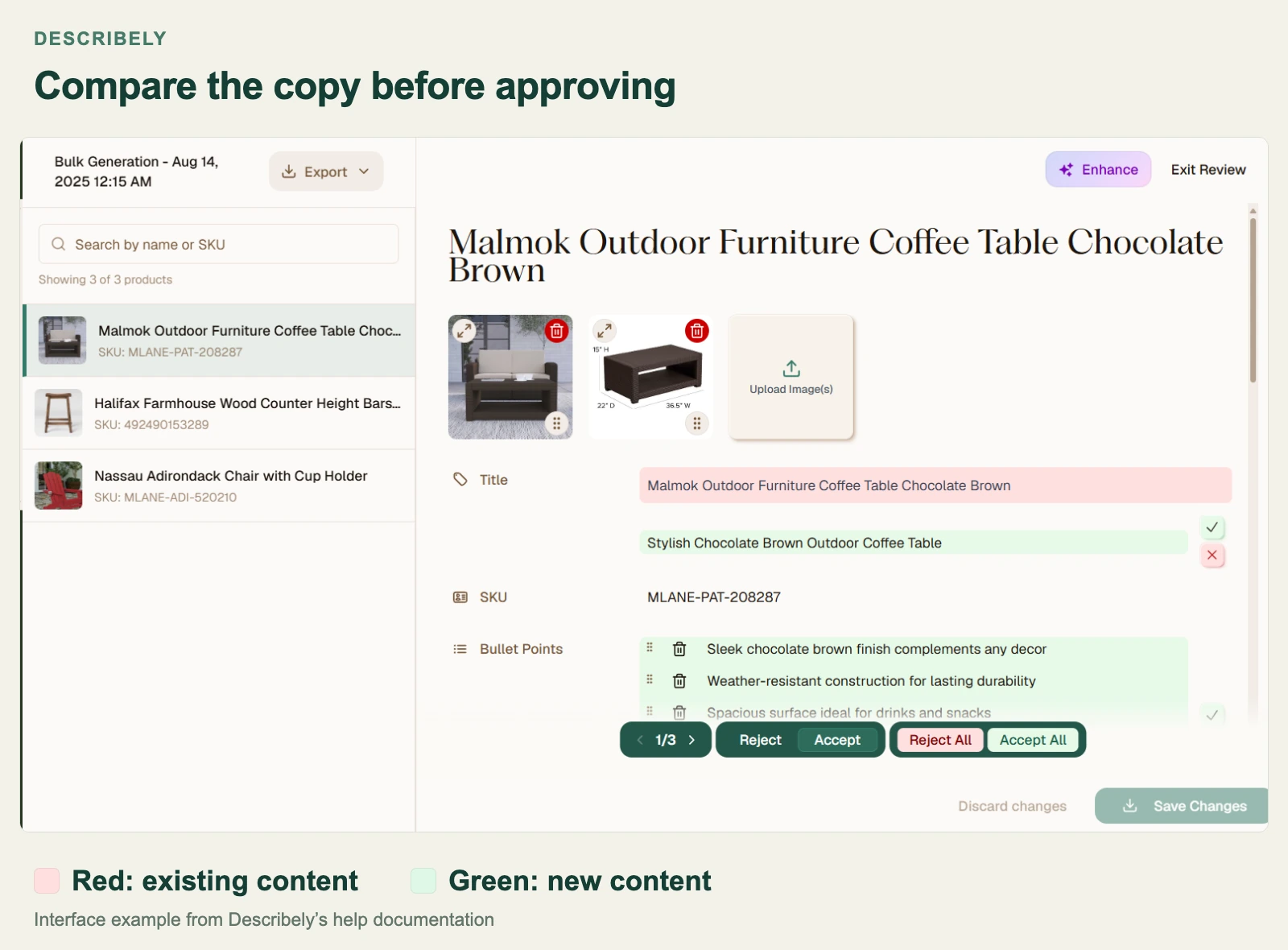
Describely brings product files into a catalog where a team can generate, review and export content in batches. Its import documentation covers CSV/Excel mapping and matching existing products by title or SKU. Its export and publishing guide covers approved content, configurable CSV columns and connected stores.
Try a product with several colors or sizes, one with missing details, and one whose specification you've corrected. Check that each SKU (the code for a sellable item) keeps the right description and that the correction reaches the export. Include product credits, data enrichment and images in the budget below.
Hypotenuse AI: filling missing product details
Hypotenuse AI puts product-data enrichment alongside content creation. Its enrichment product describes using web sources, images and specification documents to fill attributes. The pricing matrix places enrichment, product information management and custom integrations within Ecommerce Enterprise.
Ask for a demo with one of your supplier files. You should be able to see where added details came from, check them, and find out which fields can be updated in your store. Include the required store or PIM connection in the quote; a platform logo doesn't tell you which plan includes it.
Jasper: product copy within a marketing team
If the same team writes product pages, emails and ads, Jasper lets it work with shared brand rules. Jasper Grid arranges inputs and outputs in columns, imports CSV files and exports CSV/XLSX files. It supports up to 1,000 rows per project and requires Business.
For batch work, budget for Business and Grid's usage credits; Pro doesn't include Grid. Check a few rows before generating a larger file. You'll still need to match the export columns to your store's fields and review the text before publishing.
Other tools for drafting and marketing
A writing tool your team already uses may be enough for a small batch of product descriptions. Consider Copy.ai if your team already uses its marketing workflows, or ChatGPT and Rytr for drafts you'll edit and publish yourself. Anyword's Amazon description tool offers paragraphs and feature lists; its prediction score doesn't establish a sales improvement.
Consider Writesonic when you also need SEO articles and search tools. Junia offers a dedicated Etsy description generator. Before using either for a whole catalog, check how it handles sizes and colors, records approvals and transfers finished copy. A writing template alone doesn't establish those abilities.
Describely pricing and alternatives
Separate Describely's charges into three jobs: generating copy, filling missing product details and processing images. Its pricing page lists product credits at $0.75 per product for up to 500 products, enrichment credits at $0.55 each and image-processing credits at $0.05 each. The same page offers custom pricing for 500+ SKUs, so confirm which rate applies at exactly 500.
A product credit is not charged for every individual generation. Under the pay-as-you-go rules, a purchased credit must be activated within a year. The first generation or use of the tool's audit function starts a 30-day period for that product, with unlimited generations and audits during that period. If you expect to revise it again months later, ask what that later update will cost.
Describely cost examples
These examples show how the software charges add up; they are not supplier quotes. They assume one product credit per product, no repeated enrichment or image actions, and no deduction for free credits. Tax, labor and any separate API-access charges for a custom connection are excluded. For a real catalog, first confirm whether different colors and sizes count as one product or several billable SKUs.
| Work needed for this batch | Software cost under these assumptions | What to confirm before paying |
|---|---|---|
| 50 products, one English description each; complete source data and no image work | 50 × $0.75 = $37.50 | This covers one 30-day period after each product is activated. It does not deduct the first-five-products offer. |
| 500 products, each with a description plus one enrichment credit and one image-processing credit | 500 × ($0.75 + $0.55 + $0.05) = $675 as a conditional estimate | This total applies only if the $0.75 rate covers 500 products and actual credit use matches the assumptions. Confirm whether the public rate or a custom quote applies. |
| 5,000 products, with copy for several languages or sales channels | Request a custom quote; do not multiply by $0.75 | Specify the products and variants, languages, sales channels, missing-data work, image actions and how often you will update the copy. |
One enrichment credit covers one enrichment run for one product; image credits are consumed per image, and some image actions need several credits. The table's one-credit allowance is therefore an assumption to check. Also ask for a demonstration of saving and exporting different language or channel versions: generating the next version should not overwrite one you still need.
If buying through the Shopify app, check the payment option at checkout. The app FAQ lists both recurring subscriptions and pay-as-you-go purchases. A subscription keeps charging on its billing cycle; a credit purchase buys a batch of credits. They are different budget commitments.
When to keep Describely or choose an alternative
A lower monthly price alone is a weak reason to move your whole catalog. Identify the step that still takes too much work: filling missing details, writing in batches, getting copy into the store, or keeping product pages and ads consistent. Give the alternative the same data and request the same titles and descriptions, so you can see whether it actually removes a manual step.
| Your situation | Option to consider | Check this before deciding |
|---|---|---|
| Describely already handles your batch writing, review and export; you need to assess the ongoing cost | Keep Describely | Match the charges to your update schedule. Ask what happens after 30 days, how many extra data/image credits you need, and whether you can retain different versions. |
| Missing supplier details take longer to resolve than the copy takes to write | Compare Hypotenuse AI | Use an incomplete supplier file in the demo and check the sources of added details. Include enrichment, source review and your required store or PIM connection in the quote. |
| You have a small Shopify catalog and can review and save products individually | Use Shopify's built-in AI | Process a normal batch in the editor to check that you can keep up before dropping the bulk tool. |
| Your team also writes emails and ads, and spends time making the wording consistent | Compare Jasper | Include Business and Grid credits for batch work, then identify who will import, review and publish the export in your store. |
Do not move just the descriptions. Keep product codes, supplier data, writing instructions, channel-specific copy and approval records with them, or you may need to reconstruct that information in the new tool. Move a small batch first and check that every description matches the right product before migrating the rest.
Start with a product fact sheet
Before asking AI to write, prepare a product fact sheet that someone can use to check the result. “Premium insulated tumbler” does not tell you how long it keeps a drink cold or whether it leaks. Separate confirmed specifications, supported benefits and unanswered questions, so a reviewer can distinguish a useful rewrite from an invented claim.
| Information to prepare | Tumbler example | Instructions for the writer and reviewer |
|---|---|---|
| Confirmed specifications | 18/8 stainless steel; 20 fl oz; Navy | Wording can change; the material, capacity and unit cannot. The Navy item's description must not use another variant's color. |
| Benefits supported by the specifications | Reusable; fits the stated cup holder | Describe only uses or benefits the supplied information supports. Stainless steel alone does not establish leakproof performance. |
| Unknown details that must not become promises | No cold-retention time or dishwasher-safety information supplied | Leave those promises out of buyer-facing copy. List the unanswered questions separately for the operator to resolve. |
| Required copy format | Name the sales channel and category; specify titles, bullets or descriptions | Return the requested fields. Adapting the wording for Amazon or Etsy must not change the product's facts. |
| Information source and approver | Supplier specification version and the person who approved it for publication | When a specification changes, identify which products and descriptions need another review instead of guessing what the old copy was based on. |
The 15-SKU input CSV contains fictional products for practicing these checks. Replace them with confirmed source data before writing for your real catalog. Keep the operator's review checklist separate; do not import it into the store alongside product titles and descriptions.
Two product description prompts with generated examples
A useful product description prompt specifies the facts, missing information and output format. These two examples use fictional products from the test kit and preserve the original outputs from GPT-6.1 Sol in Codex, signed in with ChatGPT. Replace the sample facts with your own product data, then check the draft before publishing.
Prompt 1: draft one product from a fact sheet
Use this prompt when you have one product to list and want a title, three key points and a short description. It keeps questions for the operator separate from the text shoppers will read.
Prompt:
You are an ecommerce product-copy editor. Write English copy for a Shopify product page using only the facts below.

Audience: people choosing a tumbler for a daily commute.
Tone: practical and clear. Avoid hype and keyword stuffing.

Product facts:
- Product: Northline stainless-steel tumbler
- SKU: TMB-20-NVY
- Color: Navy
- Capacity: 20 fl oz
- 18/8 stainless steel body; PP sliding lid; silicone gasket
- Vacuum insulation; fits a cup holder
- Unknown: temperature-retention hours, dishwasher safety and leak resistance

Rules:
- Keep the color, capacity and materials exactly as supplied.
- Do not invent performance figures, certifications, care instructions or a leakproof claim.
- Keep missing facts out of shopper-facing copy. List them separately for the operator.
- This is a fictional product for a writing demonstration. Do not browse, use tools or change files.

Return only these four sections:
1. Title: at most 70 characters.
2. Key points: three bullets, each at most 15 words.
3. Description: 45–70 words.
4. Confirm before publishing: a separate list of the missing facts.
Original model output:
Title: Northline 20 fl oz Tumbler — Navy
Key points:
20 fl oz capacity in Navy.
18/8 stainless steel body; PP sliding lid; silicone gasket.
Vacuum insulation; fits a cup holder.
- Description:
The Northline stainless-steel tumbler has a 20 fl oz capacity and comes in Navy for your daily commute. Its 18/8 stainless steel body features vacuum insulation, with a PP sliding lid and silicone gasket. It fits a cup holder, giving you a convenient place to keep your drink during the trip.
- Confirm before publishing:
- Temperature-retention hours
- Dishwasher safety
- Leak resistance
The draft keeps Navy, 20 fl oz and the supplied materials. It leaves retention time, dishwasher safety and leak resistance in the operator’s list. Before using it, confirm that those open questions do not leave a buyer’s main concern unanswered.
Download this prompt · View the unedited output
Prompt 2: keep each SKU’s color and size separate
Use this bulk product description prompt for variants of the same product. Each input row gets its own draft, with the SKU kept alongside the title and description so you can match the output back to your catalog.
Prompt:
You are an ecommerce product-copy editor. Turn the three rows below into English Shopify product drafts.

Shared facts: Harbor cotton crew tee; 100% cotton; 180 gsm; regular fit; made in Portugal.
Unknown for every row: care instructions, shrinkage percentage and certifications.

SKU | Color | Size
SHT-OC-NVY-S | Navy | Small
SHT-OC-NVY-M | Navy | Medium
SHT-OC-SGE-M | Sage | Medium

Rules:
- Return exactly one row per input SKU, in the same order. Copy each SKU exactly.
- Keep each row's own color and size. Never borrow another variant's details.
- Use only the supplied facts. Do not infer organic certification from the SKU or add softness, performance or care claims.
- Write clear, practical copy without hype or keyword stuffing.
- Keep unknown facts out of the title and description; put them in the operator-only column.
- These are fictional products for a writing demonstration. Do not browse, use tools or change files.

Return only a Markdown table with columns: SKU | Title | Description | Operator checks.
Each title must include that row's color and size. Each description must be 25–40 words and include that row's color, size and all shared facts. The Operator checks column lists the missing facts.
Original model output:
SKU Title Description Operator checks SHT-OC-NVY-S Harbor Cotton Crew Tee — Navy, Small The Harbor cotton crew tee in Navy, size Small, is made from 100% cotton at 180 gsm. It has a regular fit and is made in Portugal. Missing: care instructions, shrinkage percentage, certifications. SHT-OC-NVY-M Harbor Cotton Crew Tee — Navy, Medium The Harbor cotton crew tee in Navy, size Medium, is made from 100% cotton at 180 gsm. It has a regular fit and is made in Portugal. Missing: care instructions, shrinkage percentage, certifications. SHT-OC-SGE-M Harbor Cotton Crew Tee — Sage, Medium The Harbor cotton crew tee in Sage, size Medium, is made from 100% cotton at 180 gsm. It has a regular fit and is made in Portugal. Missing: care instructions, shrinkage percentage, certifications.
All three rows keep their own SKU, color and size, including the two Navy variants. The descriptions use the same pattern because the supplied products differ only by variant; the model has no basis for inventing other differences. Check care information, shrinkage and certifications before deciding which details to add.
Download this prompt · View the unedited output
Write and publish for Shopify, Amazon and Etsy
Publishing product descriptions on Shopify, Amazon and Etsy can involve pasting text, importing a spreadsheet or using a store connection. The product facts stay the same across the three platforms, but the fields and publishing steps differ.
Shopify: draft and save in the product editor
Shopify's product editor is the simplest starting point for a merchant who needs a few descriptions inside that store. Follow the desktop generation steps, review the draft and save only when the facts and formatting are ready. Use a draft product when practicing; saving an already published product changes its live text.
For regular batch updates, ask Describely or Hypotenuse to show which Shopify fields their connection can change. Check whether colors and sizes stay separate, whether existing text gets overwritten, and who approves the update before it goes live.
Amazon: create and review listings
If the job is to list products on Amazon, first check the AI in Seller Central, its seller dashboard. Amazon's official guide covers generating product details and creating listings from spreadsheets; its bulk feature for Professional sellers includes draft review before submission. External writers can also produce copy, but a finished draft is not a submitted Amazon listing.
| What you need to do on Amazon | Option to try | Work remaining after generation |
|---|---|---|
| Create and submit a new listing inside Amazon | Seller Central AI | Supply the product data, check the title, bullets and other generated fields, then follow your account's submission process. |
| Compare several ways to write a paragraph or feature bullets | Anyword | Choose a version, check its facts and transfer it to Seller Central. An Amazon writing template does not itself provide a connection to the seller dashboard. |
| Sell the same products on Amazon and other channels | Describely or Hypotenuse AI | Ask the supplier to demonstrate the Amazon export columns and how you would import or submit them. Confirm that your plan includes that publishing method. |
| Have one team produce listings, emails and ads | Jasper Business / Grid | Match the exported titles, bullets and descriptions to the Amazon template's columns, then check the copy against the marketplace and category requirements. |
Before uploading a file, choose the current template for the relevant Amazon marketplace and category. Check title length, required attributes and the evidence for certification, warranty or compatibility claims. Correct column names and formatting mean the file is arranged properly; they do not replace a content review.
Etsy: draft descriptions and update titles
On Etsy, distinguish updating an existing title from writing a full description. Etsy's own AI suggestions primarily improve titles using existing listing information. For a description, give the materials, dimensions and making details to Junia's Etsy generator or ChatGPT, then review the draft yourself.
| What you want to change | What you can use to draft it | How to finish the listing or update |
|---|---|---|
| An existing product title | Etsy's optional title suggestions, if available in your account | Review and edit the suggestion in Etsy before deciding to use it. |
| Full descriptions for a few products | Junia AI or ChatGPT | Check materials, dimensions and shop-specific details, then paste the approved text into the matching listing. |
| Copy for the same products on Etsy and other channels | A bulk catalog tool such as Describely or Hypotenuse AI | Before buying, establish how copy will get into Etsy: pasting, file export or a supported store connection. An Etsy writing template does not prove that a tool can update listings automatically. |
Check that the title starts with the item and useful objective attributes, and follow Etsy's advice to use all 13 relevant tags. To change several existing listings, its native bulk editor can edit titles, tags and descriptions. That is different from a native bulk upload of new listings, which Etsy does not offer. Its AI guidance also excludes bot-generated listings with no human involvement, so retain human review and editing.
Three editorial examples from one fact sheet
The Shopify, Amazon and Etsy examples below use the same fictional vase to show how each channel presents a product. They were written for this guide, not produced in a test of any listed tool, and do not establish marketplace approval or search performance.
Shared facts: Ridge stoneware vase; Ocean Blue glaze; hand-thrown and glazed in Oregon; approximately 8 inches high and 4.5 inches wide; narrow neck; watertight; signed base; natural variation in glaze and dimensions. Dishwasher safety is unknown.
The Shopify sample combines a short introduction with specifications. The Amazon sample separates title, bullets and description. The Etsy sample foregrounds the maker facts and adds relevant tag ideas. All three preserve approximate dimensions and omit dishwasher claims. Before using a real version, check category fields and add verified care, processing or delivery details where shoppers need them.
Shopify description example
Ridge Hand-Thrown Stoneware Vase — Ocean Blue
Made by hand in Oregon, this Ocean Blue stoneware vase holds fresh or dried stems in a narrow-neck shape. Variations in the glaze and dimensions reflect its handmade construction.
- Approximately 8 inches high × 4.5 inches wide
- Watertight stoneware
- Signed on the base
Amazon title, bullets and description example
Title: Ridge Hand-Thrown Stoneware Vase, Ocean Blue, Approx. 8-Inch
Feature bullets:
- Hand-thrown and glazed in Oregon.
- Ocean Blue glaze with natural variation between pieces.
- Approximately 8 inches high and 4.5 inches wide.
- Watertight vessel for fresh or dried stems.
- Signed base and narrow-neck shape.
Description: The Ridge vase is a hand-thrown stoneware vessel with an Ocean Blue glaze. Its watertight body holds fresh or dried stems. Glaze and dimensions vary naturally between pieces.
Etsy title, description and tag examples
Title: Ocean Blue Hand-Thrown Stoneware Vase, Approx. 8 Inch
Description: A stoneware vase, hand-thrown and glazed in Oregon, with an Ocean Blue finish and signed base. It stands approximately 8 inches high by 4.5 inches wide. The narrow-neck, watertight shape holds fresh or dried stems; glaze and dimensions vary slightly between pieces.
Possible tags: hand thrown vase; stoneware vase; blue ceramic vase; ocean blue vase; handmade pottery; ceramic flower vase; fresh flower vase; dried flower vase; Oregon pottery; signed pottery; narrow neck vase; artisan home decor; wheel thrown pottery
How to test a bulk product description generator
Test a bulk product description generator with the same small batch and output requirements you use for other candidates. Record what you had to correct and how you exported the result to see the work your team would take on after generation.
Test kit: five product types and 15 SKUs
The kit contains five fictional product types with three variants each: 15 SKUs in total. Start with one variant of each type to look for invented facts, then add the other colors or sizes to check for mixed-up details. The table explains what to check for each product; it does not report tool test results.
| Test product | What to check in its description |
|---|---|
| Stainless-steel tumbler | Does the color match this SKU? If the source gives no cold-retention time, leakproof claim or dishwasher instructions, has the draft invented any of them? |
| Wired mechanical keyboard | Does the copy retain the wired-only limitation? Bluetooth or wireless claims would contradict the input. |
| Moisturizer | Are ingredient concentration and size unchanged? Remove treatment or clinical claims unsupported by the source. |
| Cotton shirt | Do the color and size match the SKU on that row? Certification and shrinkage claims should not appear without supporting information. |
| Handmade vase | Has “approximately” been retained with the dimensions? Check that another variant's glaze or height has not replaced this one's details. |
Download the complete test kit (ZIP). Give the input CSV to the tool, use the reviewer checklist to check its output, record errors and edits in the review log, and note settings and run details in the test record. The ZIP also contains a field dictionary, prompts and instructions in English, with English Shopify copy as the default task. Results and timing fields are blank for you to complete; the kit contains no completed tool tests.
Run a small batch through Describely
A small Describely batch takes product data through import, generation, review and export. The steps below follow its help pages; we have not executed this batch in a paid account. Use a separate test catalog and keep fictional products out of a live store.
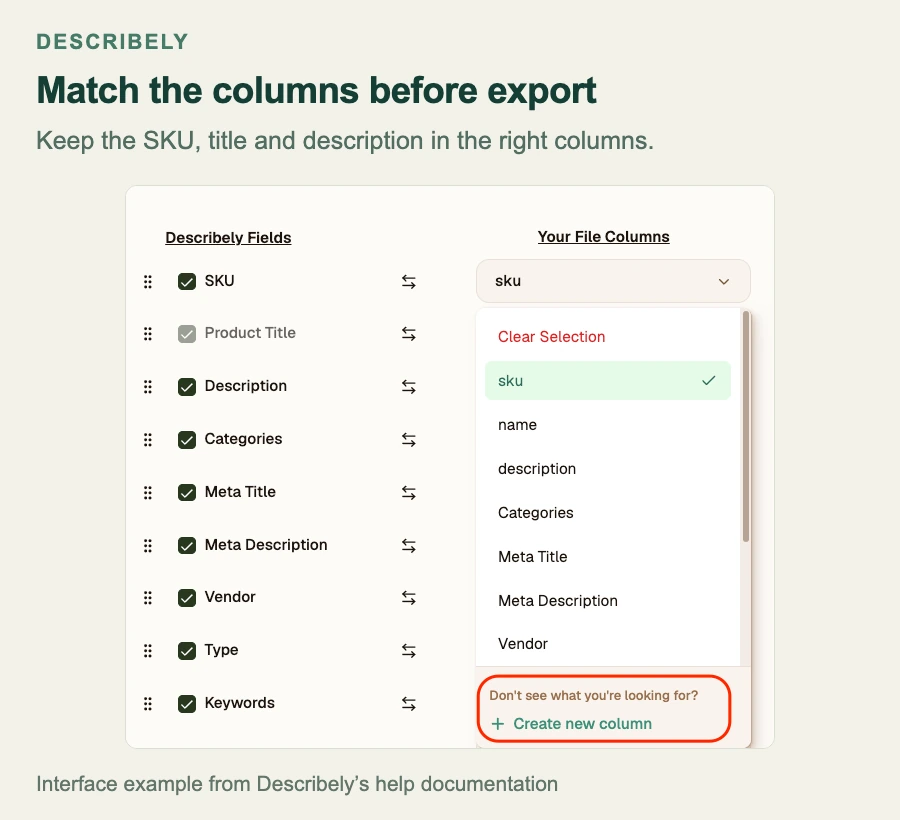
- Import the input CSV. Follow the file-import guide: include a product title and one product per row. Match
test_skuto the product's SKU field, then check where the other columns will go. Don't import the reviewer-only files. - Set the writing instructions. Add the facts the writer must preserve and claims it must avoid through its rules or supported fields. Select only the output fields you need. Turn off web enrichment and image inference for the first run; test those separately if you need them.
- Generate the selected products. Use the bulk-generation workflow. Record the chosen rows, ruleset and settings before running it. Save the first raw output before editing or retrying.
- Review every row. Compare numbers, materials and variants with the input. Record unsupported claims and missing fields before changing tone. The bulk review screen supports reviewing new content alongside existing content.
- Fix failed rows. If missing details cause a failure or unusable copy, add confirmed facts before retrying and give the rerun a new ID. Check that corrections reach the tool: an import setting that fills only empty cells will leave a wrong existing value in place.
- Export approved content. Follow the CSV export guide. Choose plain text or HTML, then check column names, product codes and special characters. Verify that each column goes to the right store field before publishing.
For each failed row, note the cause: missing product details, a column sent to the wrong field, an invented claim, mixed-up variants or a failed store import. That tells you what needs fixing and who on your team can fix it.
Calculate the cost per approved product
Calculating cost per approved product requires recording tool fees and time spent on setup, review and corrections. Keep the plan, input, settings, original draft, edits and final decision with those records. Time each review from opening the draft to approving or rejecting it, and log setup and failed-row fixes separately.
Use software and usage cost + setup labor + review and correction labor, divided by the number of products approved for publication. Include failed runs in cost but not in the approved count. If nothing is approved, report the failed trial and its cost. A small sample can inform your next test; it cannot establish a universal error rate or prove one writer is best for every store.
Frequently asked questions
Before publishing AI product descriptions, check the store connection, support for each product claim, and how you'll measure search results after the update.
Does a marketplace template include a publishing connection?
A marketplace template may only give you text to copy. Ask whether you can paste it, import a file, use an included store connection, or need a developer to build one through an API. Try one reviewed listing from draft to store before treating publishing as included.
Can AI invent a missing product specification?
AI can invent a plausible product specification when the input doesn't include one. Leave an unknown specification blank, obtain an approved source or run an enrichment process that a reviewer can check. The product-fact sheet should distinguish sourced information from a suggestion that has not been confirmed.
Are AI product descriptions automatically better for SEO?
Generating more product-description text does not establish search value. Useful descriptions answer buyer questions with accurate, specific product information. Review repeated openings and filler across the batch, and measure search performance separately from generation speed or a vendor's content score.
Sources and review notes
This comparison of AI product description generators uses official product, pricing and marketplace sources linked throughout. We haven't measured the tools' relative writing quality, time savings or error rates. The channel examples, prompt demonstrations and test kit use fictional products; the cost examples use the assumptions shown beside them.
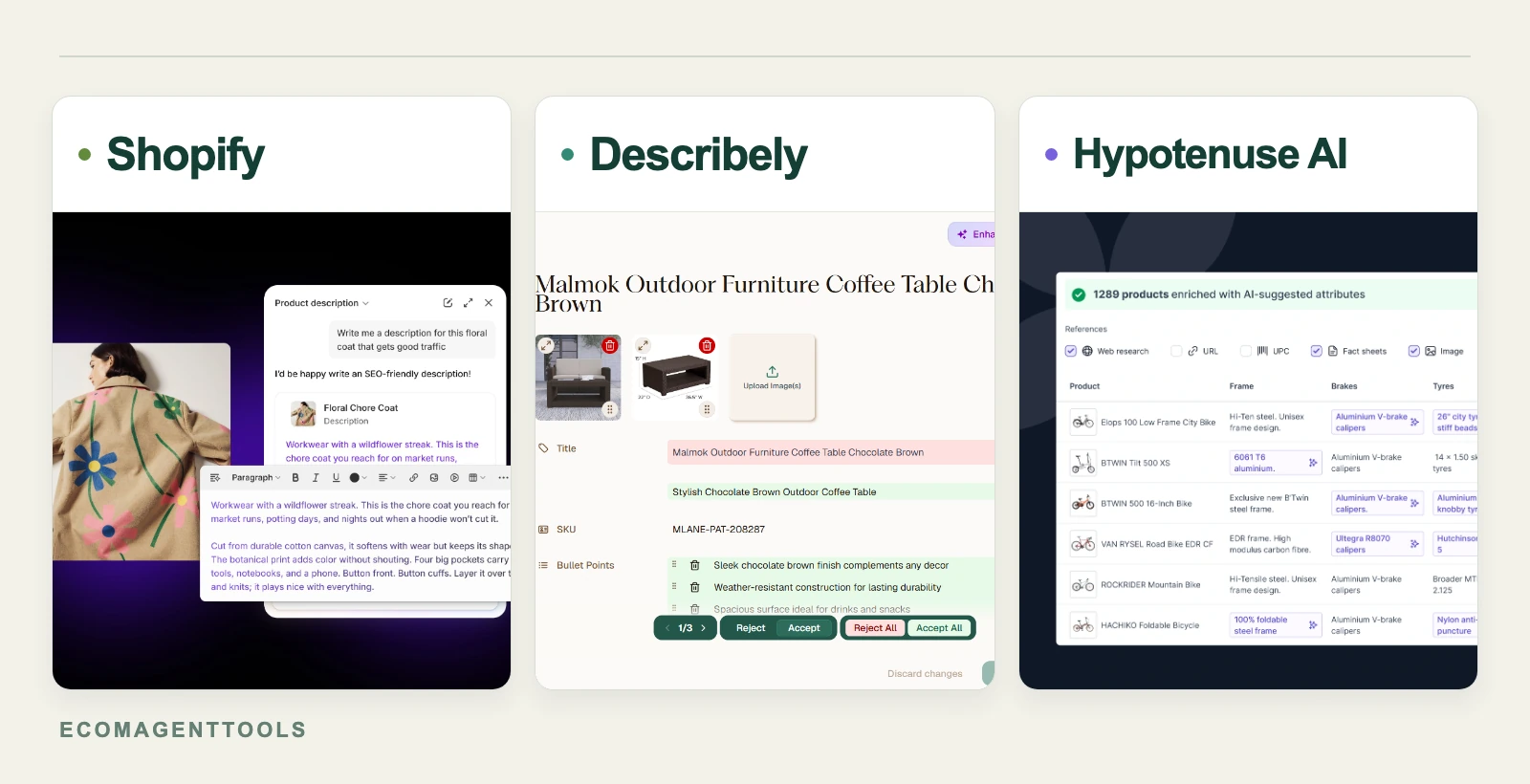
The cover combines website examples from Shopify Sidekick, Describely and Hypotenuse AI. The products, counts and copy shown come from the vendors' examples, not a run of our test kit. The two Describely figures also use its official help images, with editorial labels added.
Check current purchase terms and marketplace requirements before using a tool on your live catalog. For other store tasks, see the EcomAgentTools ecommerce AI guide.

Comments
Share experience or ask a question. Comments are plain text; any external link is automatically marked nofollow.
No comments yet.